<feed xmlns="http://www.w3.org/2005/Atom">
  <title>nblock&#39;s ~</title>
  <link href="https://nblock.org/index.xml" rel="self"/>
  <link href="https://nblock.org/"/>
  <updated>2022-07-03T00:00:00+00:00</updated>
  <id>https://nblock.org/</id>
  <author>
    <name>Florian Preinstorfer</name>
  </author>
  <generator>Hugo</generator>
  <entry>
    <title type="html"><![CDATA[Direct Tailscale connections with a HP ProCurve switch]]></title>
    <link href="https://nblock.org/2022/07/03/direct-tailscale-connections-with-a-hp-procurve-switch/"/>
    <id>https://nblock.org/2022/07/03/direct-tailscale-connections-with-a-hp-procurve-switch/</id>
    <author>
      <name>Florian Preinstorfer</name>
    </author>
    <published>2022-07-03T00:00:00+00:00</published>
    <updated>2022-07-03T00:00:00+00:00</updated>
    
    <content type="html"><![CDATA[<p>I started experimenting with <a href="https://tailscale.com/">Tailscale</a> (along
with the self-hosted coordination server
<a href="https://github.com/juanfont/headscale">Headscale</a>) and I like it pretty
much. One of the interesting properties of Tailscale is the separation
of control and data plane, where it tries to establish a
<a href="https://tailscale.com/blog/how-nat-traversal-works/">direct</a>
point-to-point <a href="https://www.wireguard.com/">WireGuard</a> tunnel between
peers. It gracefully falls back to <a href="https://tailscale.com/blog/how-tailscale-works/#encrypted-tcp-relays-derp">relay
servers</a>
if such a connection is not possible. This avoids a central VPN server
that needs to be involved in every connection.</p>
<p>One can use the command <code>tailscale status</code> to find out if a direct
connection between peers is used:</p>
<pre tabindex="0"><code>100.64.0.1  host1 net1    linux   active; relay &#34;lhr&#34;, tx 33036 rx 27232
100.64.0.2  host2 net2    linux   active; direct 192.168.1.2:41641, tx 13892 rx 10024
</code></pre><p>The connection to <code>host1</code> is relayed via a DERP server and the
connection to <code>host2</code> is direct where the WireGuard tunnel uses
192.168.1.2 as the outer IP address.</p>
<p>One day, I noticed something odd: direct connections between two peers
in my local network are only possible if one of them uses WLAN. As soon
as both peers are connected to the same switch, packets are sent via a
relay. The peers are all on the same LAN and there are no weird firewall
rules that block traffic. So it clearly should use a direct connection.</p>
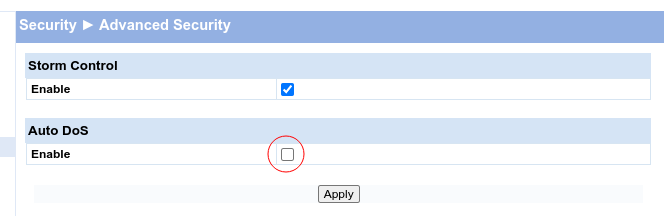
<p>The solution is buried in the config of my HP ProCurve switch. It tries
to be smart about DoS protection and has the innocent looking flag
<code>Auto DoS</code> set:</p>
<p><img loading="lazy" src="/2022/07/03/direct-tailscale-connections-with-a-hp-procurve-switch/hp-procurve-advanced-security.png" type="" alt="HP ProCurve Advanced Security settings"  title="HP ProCurve Advanced Security settings"  /></p>
<p>A direct connection is possible as soon as the feature <code>Auto DoS</code> is disabled.</p>
]]></content>
    
  </entry>
  <entry>
    <title type="html"><![CDATA[Sync date and time on an offline Fronius Datalogger]]></title>
    <link href="https://nblock.org/2021/04/09/sync-date-and-time-on-an-offline-fronius-datalogger/"/>
    <id>https://nblock.org/2021/04/09/sync-date-and-time-on-an-offline-fronius-datalogger/</id>
    <author>
      <name>Florian Preinstorfer</name>
    </author>
    <published>2021-04-09T00:00:00+00:00</published>
    <updated>2021-04-09T00:00:00+00:00</updated>
    
    <content type="html"><![CDATA[<h2 id="background-and-introduction">Background and introduction</h2>
<p>I&rsquo;m currently working on extracting metrics from multiple Fronius Symo
inverters. There are essentially two approaches to solve this problem:</p>
<ul>
<li>Connect the inverter with the Internet and upload everything to
SolarWeb, a proprietary metrics platform hosted by Fronius. Use the
Fronius SolarWeb mobile app to view the data.</li>
<li>Operate the device offline and collect the metrics yourself. Fronius
offers a JSON based
<a href="https://www.fronius.com/en/solar-energy/installers-partners/technical-data/all-products/system-monitoring/open-interfaces/fronius-solar-api-json-">API</a>
to query realtime and archive data from an inverter. Furthermore, the
device also offers a push service, where the inverter can upload its
metrics continuously to a FTP server or send it to a HTTP endpoint.
Both methods can be used without in Internet connection.</li>
</ul>
<p>As you might have guessed, I implemented the second approach where each
inverter pushes its metrics continuously to a server on the local
network. From there, it is picked up and imported into InfluxDB. Grafana
is used to visualize the metrics. Please contact me, if you are
interested in how to get collection, transfer to InfluxDB and
visualization up- and running for Fronius inverters.</p>
<h2 id="lost-date-and-time">Lost date and time</h2>
<p>After a few days of metrics collection, I noticed that one of the
inverters regularly loses its local date and time. Getting timeseries
data with a timestamp of 2000-01-01T05:02:15 is not very helpful.</p>
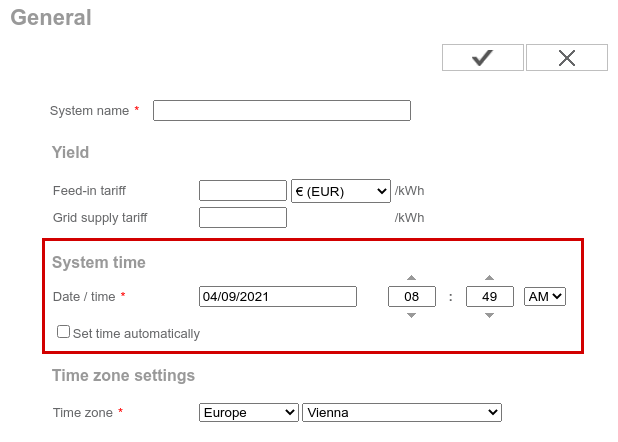
<p>The inverter&rsquo;s webinterface offers to set the system time and also has a
checkbox for &ldquo;Set time automatically&rdquo;.</p>
<p><img loading="lazy" src="/2021/04/09/sync-date-and-time-on-an-offline-fronius-datalogger/fronius-datalogger-general-settings.png" type="" alt="Configure date and time."  title="Configure date and time."  /></p>
<p>Great, simply enable automatic time synchronization and allow outgoing
NTP traffic (and DNS). As it turns out, the inverter does not use NTP to
synchronize its system time. It <em>requires</em> the user to enable the
metrics upload to SolarWeb in order to synchronize its system time!</p>
<p>I did not want to re-implement parts of the proprietary, UDP based
protocol (PCAP dumps are available upon request), so I decided to check
the
<a href="https://www.fronius.com/en/solar-energy/installers-partners/technical-data/all-products/system-monitoring/open-interfaces/fronius-solar-api-json-">API</a>
docs for endpoints related to date and time settings. Unfortunately, I
could not find such an endpoint.</p>
<p>The next approach was to inspect the requests of the web browser and
rebuild the necessary requests in curl. Put those requests in a script
and invoke it regularly. The steps are easy:</p>
<ul>
<li>Authenticate with the device (only HTTP Digest auth is supported)</li>
<li>Set date and time</li>
</ul>
<p>As it turns out, the HTTP Digest implementation does not conform to the
relevant <a href="https://tools.ietf.org/html/rfc7235">RFC 7235</a>. From section
4.1:</p>
<blockquote>
<p>A server generating a 401 (Unauthorized) response MUST send a
WWW-Authenticate header field containing at least one challenge. A
server MAY generate a WWW-Authenticate header field in other response
messages to indicate that supplying credentials (or different
credentials) might affect the response.</p></blockquote>
<p>The datalogger does not respond with a <code>WWW-Authenticate</code> header, but
instead sends a <code>X-WWW-Authenticate</code> header, which breaks the
authentication workflow in curl. As there is no way to override the
expected HTTP header in curl, I decided to implement (the broken)
Fronius HTTP Digest authentication myself in Python. The workaround is
easy, subclass the <code>HTTPDigestAuth</code> class from
<a href="https://github.com/psf/requests/blob/v2.25.1/requests/auth.py#L108">Requests</a>
and fixup the header name before Requests reads the header value.</p>
<div class="highlight"><pre tabindex="0" style="color:#586e75;background-color:#eee8d5;-moz-tab-size:4;-o-tab-size:4;tab-size:4;"><code class="language-python" data-lang="python"><span style="display:flex;"><span><span style="color:#dc322f;font-weight:bold">from</span> <span style="color:#268bd2">requests.auth</span> <span style="color:#dc322f;font-weight:bold">import</span> <span style="color:#268bd2">HTTPDigestAuth</span>
</span></span><span style="display:flex;"><span>
</span></span><span style="display:flex;"><span><span style="color:#859900">class</span> <span style="color:#cb4b16">HTTPDigestAuthFronius</span>(<span style="color:#268bd2">HTTPDigestAuth</span>):
</span></span><span style="display:flex;"><span>    <span style="color:#859900">def</span> <span style="color:#268bd2">handle_401</span>(<span style="color:#cb4b16">self</span>, <span style="color:#268bd2">r</span>, **<span style="color:#268bd2">kwargs</span>):
</span></span><span style="display:flex;"><span>        <span style="color:#93a1a1;font-style:italic"># Replace www-authenticate unconditionally</span>
</span></span><span style="display:flex;"><span>        <span style="color:#268bd2">r</span>.<span style="color:#268bd2">headers</span>[<span style="color:#2aa198">&#34;www-authenticate&#34;</span>] = <span style="color:#268bd2">r</span>.<span style="color:#268bd2">headers</span>.<span style="color:#268bd2">get</span>(<span style="color:#2aa198">&#34;x-www-authenticate&#34;</span>)
</span></span><span style="display:flex;"><span>        <span style="color:#859900">return</span> <span style="color:#cb4b16">super</span>().<span style="color:#268bd2">handle_401</span>(<span style="color:#268bd2">r</span>, **<span style="color:#268bd2">kwargs</span>)
</span></span></code></pre></div><p>The entire script is available <a href="fronius_datalogger_set_time.py">here</a> (tested on Python 3.9 with Requests 2.25).</p>
<h2 id="conclusion">Conclusion</h2>
<p>Please use open standards and established protocols for common tasks
such as NTP for keeping the system time in sync. Furthermore, don&rsquo;t mess
with the standards, just implement/use them as-is and test them with
standard tools such as curl.</p>
]]></content>
    
  </entry>
  <entry>
    <title type="html"><![CDATA[Feeds 2020.5.16]]></title>
    <link href="https://nblock.org/2020/05/16/feeds-2020.5.16/"/>
    <id>https://nblock.org/2020/05/16/feeds-2020.5.16/</id>
    <author>
      <name>Florian Preinstorfer</name>
    </author>
    <published>2020-05-16T00:00:00+00:00</published>
    <updated>2020-05-16T00:00:00+00:00</updated>
    
    <content type="html"><![CDATA[<p>Almost four years after the initial commit, I&rsquo;m really happy to announce the first release of Feeds! Feeds provides
Atom/RSS feeds in times of social media and paywall. From the <a href="https://pyfeeds.readthedocs.io">documentation</a>:</p>
<blockquote>
<p>Once upon a time every website offered an RSS feed to keep readers updated about new articles/blog posts via the
users’ feed readers. These times are long gone. The once iconic orange RSS icon has been replaced by “social share”
buttons.</p>
<p>Feeds aims to bring back the good old reading times. It creates Atom feeds for websites that don’t offer them
(anymore). It allows you to read new articles of your favorite websites in your feed reader (e.g. TinyTinyRSS) even if
this is not officially supported by the website.</p></blockquote>
<p>Feeds is able to create full text Atom feeds for many different sites. Head over to the list of <a href="https://pyfeeds.readthedocs.io/en/latest/spiders.html">supported
websites</a> to see if your favourite site is supported.</p>
<p>You may <a href="https://pyfeeds.readthedocs.io/en/latest/get.html">install Feeds</a> directly from PyPi (please note that the name
on PyPi is different):</p>
<div class="highlight"><pre tabindex="0" style="color:#586e75;background-color:#eee8d5;-moz-tab-size:4;-o-tab-size:4;tab-size:4;"><code class="language-bash" data-lang="bash"><span style="display:flex;"><span>$ pip install PyFeeds
</span></span><span style="display:flex;"><span>$ feeds crawl orf.at
</span></span></code></pre></div><p>Have a look at the <a href="https://pyfeeds.readthedocs.io/en/latest/quickstart.html">quickstart</a> section for more usage
information.</p>
<ul>
<li>Source Code: <a href="https://github.com/PyFeeds/PyFeeds">https://github.com/PyFeeds/PyFeeds</a></li>
<li>PyPi: <a href="https://pypi.org/project/PyFeeds/">https://pypi.org/project/PyFeeds/</a></li>
<li>Documentation: <a href="https://pyfeeds.readthedocs.io">https://pyfeeds.readthedocs.io</a></li>
</ul>
<p>While I started the project back in 2016, it was
<a href="https://www.notinventedhere.org/">Lukas</a> that really kept the project
going and contributed most of the code to it. Thank you and all other
<a href="https://github.com/PyFeeds/PyFeeds/graphs/contributors">contributors</a>
very much!</p>
]]></content>
    
  </entry>
  <entry>
    <title type="html"><![CDATA[Assert in OpenLDAP with password policy overlay]]></title>
    <link href="https://nblock.org/2020/01/27/assert-in-openldap-with-password-policy/"/>
    <id>https://nblock.org/2020/01/27/assert-in-openldap-with-password-policy/</id>
    <author>
      <name>Florian Preinstorfer</name>
    </author>
    <published>2020-01-27T00:00:00+00:00</published>
    <updated>2020-01-27T00:00:00+00:00</updated>
    
    <content type="html"><![CDATA[<p>I got my hands on an OpenLDAP instance which started to exist sometime
around 2004. The instance was upgraded several times and was quite
unstable. It crashed seemingly at random when some users logged in on an
LDAP enabled system. The only thing that popped up consistently during
those crashes was the password policy overlay (<code>ppolicy</code>). Turning it
off made the crashes disappear. As the password policy overlay is
required by the customer, disabling it was just a temporary solution.</p>
<p>The first step was to reproduce the crash. It turned out, that enabling
password authentication in <code>OpenSSH</code> while using <code>nslcd</code> triggered the
assertion reliably. When a crash occurs, one can find the following line
in OpenLDAP&rsquo;s logs:</p>
<pre tabindex="0"><code class="language-none" data-lang="none">slapd: ppolicy.c:912: ctrls_cleanup: Assertion `rs-&gt;sr_ctrls != NULL`
</code></pre><p>This assertion
<a href="https://www.openldap.org/its/index.cgi/Software%20Bugs?id=7384">was</a>
<a href="https://www.openldap.org/its/index.cgi/Software%20Bugs?id=7966">reported</a>
<a href="https://bugs.debian.org/cgi-bin/bugreport.cgi?bug=670907">several</a>
<a href="https://bugzilla.redhat.com/show_bug.cgi?id=1335194">times</a> and one of
the reports was closed with the
<a href="https://bugzilla.redhat.com/show_bug.cgi?id=1335194#c8">comment</a>:</p>
<blockquote>
<p>This turned out to be a configuration issue. Closing this out as NOTABUG.</p></blockquote>
<p>Unfortunately, the solution was not posted and it is hidden somewhere
behind RedHat&rsquo;s commercial support website.</p>
<p>After the usual GDB session without much success, I decided to review
the configuration of this particular instance:</p>
<div class="highlight"><pre tabindex="0" style="color:#586e75;background-color:#eee8d5;-moz-tab-size:4;-o-tab-size:4;tab-size:4;"><code class="language-bash" data-lang="bash"><span style="display:flex;"><span>$ <span style="color:#cb4b16">cd</span> /etc/ldap/slapd.d
</span></span><span style="display:flex;"><span>$ sudo grep -ri <span style="color:#2aa198">&#34;ppolicy&#34;</span>
</span></span><span style="display:flex;"><span>...
</span></span><span style="display:flex;"><span><span style="color:#268bd2">cn</span>=config/olcDatabase={1}mdb/olcOverlay={2}ppolicy.ldif:dn: <span style="color:#268bd2">olcOverlay</span>={3}ppolicy
</span></span><span style="display:flex;"><span><span style="color:#268bd2">cn</span>=config/olcDatabase={1}mdb/olcOverlay={2}ppolicy.ldif:objectClass: olcPPolicyConfig
</span></span><span style="display:flex;"><span><span style="color:#268bd2">cn</span>=config/olcDatabase={1}mdb/olcOverlay={2}ppolicy.ldif:olcOverlay: {3}ppolicy
</span></span><span style="display:flex;"><span><span style="color:#268bd2">cn</span>=config/olcDatabase={1}mdb/olcOverlay={2}ppolicy.ldif:olcPPolicyDefault: <span style="color:#268bd2">cn</span>=default,ou=...
</span></span><span style="display:flex;"><span><span style="color:#268bd2">cn</span>=config/olcDatabase={1}mdb/olcOverlay={2}ppolicy.ldif:structuralObjectClass: olcPPolicyConfig
</span></span><span style="display:flex;"><span><span style="color:#268bd2">cn</span>=config/olcDatabase={1}mdb/olcOverlay={3}ppolicy.ldif:dn: <span style="color:#268bd2">olcOverlay</span>={3}ppolicy
</span></span><span style="display:flex;"><span><span style="color:#268bd2">cn</span>=config/olcDatabase={1}mdb/olcOverlay={3}ppolicy.ldif:objectClass: olcPPolicyConfig
</span></span><span style="display:flex;"><span><span style="color:#268bd2">cn</span>=config/olcDatabase={1}mdb/olcOverlay={3}ppolicy.ldif:olcOverlay: {3}ppolicy
</span></span><span style="display:flex;"><span><span style="color:#268bd2">cn</span>=config/olcDatabase={1}mdb/olcOverlay={3}ppolicy.ldif:olcPPolicyDefault: <span style="color:#268bd2">cn</span>=default,ou=...
</span></span><span style="display:flex;"><span><span style="color:#268bd2">cn</span>=config/olcDatabase={1}mdb/olcOverlay={3}ppolicy.ldif:structuralObjectClass: olcPPolicyConfig
</span></span><span style="display:flex;"><span>...
</span></span></code></pre></div><p>As one can see, the <code>ppolicy</code> overlay is referenced twice and the fix is
quite easy: Remove the second <code>ppolicy</code> reference:</p>
<div class="highlight"><pre tabindex="0" style="color:#586e75;background-color:#eee8d5;-moz-tab-size:4;-o-tab-size:4;tab-size:4;"><code class="language-bash" data-lang="bash"><span style="display:flex;"><span>$ sudo systemctl stop slapd
</span></span><span style="display:flex;"><span>$ sudo rm cn<span style="color:#2aa198">\=</span>config/olcDatabase<span style="color:#2aa198">\=\{</span>1<span style="color:#2aa198">\}</span>mdb/olcOverlay<span style="color:#2aa198">\=\{</span>3<span style="color:#2aa198">\}</span>ppolicy.ldif
</span></span><span style="display:flex;"><span>$ sudo slaptest -F /etc/ldap/slapd.d
</span></span><span style="display:flex;"><span>config file testing succeeded
</span></span><span style="display:flex;"><span>$ sudo systemctl start slapd
</span></span></code></pre></div><p>The instance is now operating reliably.</p>
]]></content>
    
  </entry>
  <entry>
    <title type="html"><![CDATA[Temporarily disable journalctl output coloring]]></title>
    <link href="https://nblock.org/2020/01/27/temporarily-disable-journalctl-output-coloring/"/>
    <id>https://nblock.org/2020/01/27/temporarily-disable-journalctl-output-coloring/</id>
    <author>
      <name>Florian Preinstorfer</name>
    </author>
    <published>2020-01-27T00:00:00+00:00</published>
    <updated>2020-01-27T00:00:00+00:00</updated>
    
    <content type="html"><![CDATA[<p>While debugging an issue with OpenLDAP, I noticed that <code>journalctl</code>
colors its output. From the man page:</p>
<blockquote>
<p>When outputting to a tty, lines are colored according to priority:
lines of level ERROR and higher are colored red; lines of level NOTICE
and higher are highlighted; lines of level DEBUG are colored lighter
grey; other lines are displayed normally.</p></blockquote>
<p>While this is nice for higher priority levels such as <code>ERROR</code>, it is not
useful for messages with <code>DEBUG</code> priority. Those appear in light grey
which makes them hard to read on terminal themes with a light
background.</p>
<p>The easiest way is to set the environment variable <code>SYSTEMD_COLORS</code>
which overrides automatic coloring. To follow the OpenLDAP debug log:</p>
<div class="highlight"><pre tabindex="0" style="color:#586e75;background-color:#eee8d5;-moz-tab-size:4;-o-tab-size:4;tab-size:4;"><code class="language-bash" data-lang="bash"><span style="display:flex;"><span>$ sudo <span style="color:#268bd2">SYSTEMD_COLORS</span>=<span style="color:#cb4b16">false</span> journalctl -u slapd -f
</span></span></code></pre></div>]]></content>
    
  </entry>
  <entry>
    <title type="html"><![CDATA[Tryton GTK client inside a virtualenv]]></title>
    <link href="https://nblock.org/2018/09/27/tryton-gtk-client-inside-a-virtualenv/"/>
    <id>https://nblock.org/2018/09/27/tryton-gtk-client-inside-a-virtualenv/</id>
    <author>
      <name>Florian Preinstorfer</name>
    </author>
    <published>2018-09-27T00:00:00+00:00</published>
    <updated>2018-09-27T00:00:00+00:00</updated>
    
    <content type="html"><![CDATA[<p>I&rsquo;m currently working on a <a href="https://tryton.org">Tryton</a> upgrade from 4.2
to 5.0 (via intermediate releases 4.4, 4.6 and 4.8).
<a href="https://tryton.org">Tryton</a> 5.0 is the first long term support release
with support for 5 years. A useful property for an ERP system. In order
to test each of the intermediate versions, I decided to quickly spawn a
virtualenv and install the <a href="https://tryton.org">Tryton</a> GTK client in
there.</p>
<div class="highlight"><pre tabindex="0" style="color:#586e75;background-color:#eee8d5;-moz-tab-size:4;-o-tab-size:4;tab-size:4;"><code class="language-bash" data-lang="bash"><span style="display:flex;"><span>$ virtualenv -p python2 venv-tryton-4.4
</span></span><span style="display:flex;"><span>$ . venv-tryton-4.4/bin/activate
</span></span><span style="display:flex;"><span>$ pip install tryton~=4.4
</span></span><span style="display:flex;"><span>$ tryton
</span></span><span style="display:flex;"><span>Traceback (most recent call last):
</span></span><span style="display:flex;"><span>  File <span style="color:#2aa198">&#34;~/venv-tryton-4.4/bin/tryton&#34;</span>, line 48, in &lt;module&gt;
</span></span><span style="display:flex;"><span>    from tryton import client
</span></span><span style="display:flex;"><span>  File <span style="color:#2aa198">&#34;~/venv-tryton-4.4/local/lib/python2.7/site-packages/tryton/client.py&#34;</span>, line 17, in &lt;module&gt;
</span></span><span style="display:flex;"><span>    import pygtk
</span></span><span style="display:flex;"><span>ImportError: No module named pygtk
</span></span></code></pre></div><p>Installing <code>pygtk</code> and its dependencies in a virtualenv is not without
its problems. But, there is a rather quick (and hackish) solution to
this problem. This is only suitable for quick tests and experiments. Use
proper Debian packages on production systems.</p>
<h2 id="python-27">Python 2.7</h2>
<div class="highlight"><pre tabindex="0" style="color:#586e75;background-color:#eee8d5;-moz-tab-size:4;-o-tab-size:4;tab-size:4;"><code class="language-bash" data-lang="bash"><span style="display:flex;"><span>$ virtualenv -p python2 venv-tryton-4.4
</span></span><span style="display:flex;"><span>$ . venv-tryton-4.4/bin/activate
</span></span><span style="display:flex;"><span>$ pip install tryton~=4.4
</span></span><span style="display:flex;"><span>$ pip install PyGObject
</span></span><span style="display:flex;"><span>$ ln -s /usr/lib/python2.7/dist-packages/pygtk.py <span style="color:#268bd2">$VIRTUAL_ENV</span>/lib/python2.7/site-packages
</span></span><span style="display:flex;"><span>$ ln -s /usr/lib/python2.7/dist-packages/gtk-2.0 <span style="color:#268bd2">$VIRTUAL_ENV</span>/lib/python2.7/site-packages
</span></span><span style="display:flex;"><span>$ ln -s /usr/lib/python2.7/dist-packages/gobject <span style="color:#268bd2">$VIRTUAL_ENV</span>/lib/python2.7/site-packages
</span></span><span style="display:flex;"><span>$ ln -s /usr/lib/python2.7/dist-packages/glib <span style="color:#268bd2">$VIRTUAL_ENV</span>/lib/python2.7/site-packages
</span></span><span style="display:flex;"><span>$ ln -s /usr/lib/python2.7/dist-packages/gi <span style="color:#268bd2">$VIRTUAL_ENV</span>/lib/python2.7/site-packages
</span></span><span style="display:flex;"><span>$ ln -s /usr/lib/python2.7/dist-packages/pygtkcompat <span style="color:#268bd2">$VIRTUAL_ENV</span>/lib/python2.7/site-packages
</span></span><span style="display:flex;"><span>$ tryton
</span></span></code></pre></div><p>Obviously, GTK 2 and the respective Python bindings must be installed.</p>
<h2 id="python-3x">Python 3.x</h2>
<div class="highlight"><pre tabindex="0" style="color:#586e75;background-color:#eee8d5;-moz-tab-size:4;-o-tab-size:4;tab-size:4;"><code class="language-bash" data-lang="bash"><span style="display:flex;"><span>$ virtualenv -p python3 venv-tryton-4.8
</span></span><span style="display:flex;"><span>$ . venv-tryton-4.8/bin/activate
</span></span><span style="display:flex;"><span>$ pip install tryton~=4.8
</span></span><span style="display:flex;"><span>$ pip install PyGObject
</span></span><span style="display:flex;"><span>$ tryton
</span></span></code></pre></div><p>By the way: <a href="https://tryton.org">Tryton</a> 5.0 and later versions will
only support Python 3.x and GTK 3.</p>
<p>Tested on Debian Testing with Python 2.7.15, Python 3.6.6 and
<a href="https://tryton.org">Tryton</a> 4.4, 4.6, 4.8 and 5.0.</p>
]]></content>
    
  </entry>
  <entry>
    <title type="html"><![CDATA[SQLAlchemy automap and custom types]]></title>
    <link href="https://nblock.org/2018/04/03/sqlalchemy-automap-and-custom-types/"/>
    <id>https://nblock.org/2018/04/03/sqlalchemy-automap-and-custom-types/</id>
    <author>
      <name>Florian Preinstorfer</name>
    </author>
    <published>2018-04-03T00:00:00+00:00</published>
    <updated>2018-04-03T00:00:00+00:00</updated>
    
    <content type="html"><![CDATA[<p>An API is an important part of an application when it comes to
automation. For those web applications that do not offer an API, I
typically write some small application on top of
<a href="https://scrapy.org/">Scrapy</a> or
<a href="http://docs.python-requests.org/en/master/">Requests</a> to solve the
problem.</p>
<p>The application in question is an old PHP application. There is no API
available and adding an API to it is out of scope. MySQL is used as the
database and most of the 79 tables are stored with MyISAM. Recently
added tables are stored with InnoDB. There are just a few unique
constraints on the database side and no foreign key constraints (due to
MyISAM). The entire logic is coded into the PHP application.</p>
<p>The web application&rsquo;s database can be accessed directly, so there is no
need for scraping. The following SQL listing provides a minimal working
example for the purpose of this blog post.</p>
<div class="highlight"><pre tabindex="0" style="color:#586e75;background-color:#eee8d5;-moz-tab-size:4;-o-tab-size:4;tab-size:4;"><code class="language-sql" data-lang="sql"><span style="display:flex;"><span><span style="color:#93a1a1;font-style:italic">-- create tables
</span></span></span><span style="display:flex;"><span><span style="color:#93a1a1;font-style:italic"></span><span style="color:#859900">CREATE</span> <span style="color:#859900">TABLE</span> <span style="color:#859900">IF</span> <span style="color:#859900">NOT</span> <span style="color:#859900">EXISTS</span> `<span style="color:#268bd2">hosts</span>` (
</span></span><span style="display:flex;"><span>  `<span style="color:#268bd2">id</span>` <span style="color:#cb4b16">int</span>(<span style="color:#2aa198;font-weight:bold">11</span>) <span style="color:#859900">NOT</span> <span style="color:#859900">NULL</span> <span style="color:#268bd2">AUTO_INCREMENT</span>,
</span></span><span style="display:flex;"><span>  `<span style="color:#268bd2">name</span>` <span style="color:#cb4b16">varchar</span>(<span style="color:#2aa198;font-weight:bold">255</span>) <span style="color:#859900">NOT</span> <span style="color:#859900">NULL</span>,
</span></span><span style="display:flex;"><span>  `<span style="color:#859900">state</span>` <span style="color:#cb4b16">int</span>(<span style="color:#2aa198;font-weight:bold">1</span>) <span style="color:#859900">NOT</span> <span style="color:#859900">NULL</span> <span style="color:#859900">DEFAULT</span> <span style="color:#2aa198">&#39;1&#39;</span>,
</span></span><span style="display:flex;"><span>  `<span style="color:#268bd2">os_id</span>` <span style="color:#cb4b16">int</span>(<span style="color:#2aa198;font-weight:bold">11</span>) <span style="color:#859900">NOT</span> <span style="color:#859900">NULL</span> <span style="color:#859900">DEFAULT</span> <span style="color:#2aa198">&#39;1&#39;</span>,
</span></span><span style="display:flex;"><span>  <span style="color:#859900">PRIMARY</span> <span style="color:#859900">KEY</span> (`<span style="color:#268bd2">id</span>`),
</span></span><span style="display:flex;"><span>  <span style="color:#859900">UNIQUE</span> <span style="color:#859900">KEY</span> `<span style="color:#268bd2">name</span>` (`<span style="color:#268bd2">name</span>`)
</span></span><span style="display:flex;"><span>) <span style="color:#268bd2">ENGINE</span>=<span style="color:#268bd2">MyISAM</span>  <span style="color:#859900">DEFAULT</span> <span style="color:#268bd2">CHARSET</span>=<span style="color:#268bd2">latin1</span> <span style="color:#268bd2">AUTO_INCREMENT</span>=<span style="color:#2aa198;font-weight:bold">8</span> ;
</span></span><span style="display:flex;"><span>
</span></span><span style="display:flex;"><span><span style="color:#859900">CREATE</span> <span style="color:#859900">TABLE</span> <span style="color:#859900">IF</span> <span style="color:#859900">NOT</span> <span style="color:#859900">EXISTS</span> `<span style="color:#268bd2">os_types</span>` (
</span></span><span style="display:flex;"><span>  `<span style="color:#268bd2">id</span>` <span style="color:#cb4b16">int</span>(<span style="color:#2aa198;font-weight:bold">11</span>) <span style="color:#859900">NOT</span> <span style="color:#859900">NULL</span> <span style="color:#268bd2">AUTO_INCREMENT</span>,
</span></span><span style="display:flex;"><span>  `<span style="color:#268bd2">name</span>` <span style="color:#cb4b16">varchar</span>(<span style="color:#2aa198;font-weight:bold">255</span>) <span style="color:#859900">NOT</span> <span style="color:#859900">NULL</span>,
</span></span><span style="display:flex;"><span>  <span style="color:#859900">PRIMARY</span> <span style="color:#859900">KEY</span> (`<span style="color:#268bd2">id</span>`),
</span></span><span style="display:flex;"><span>  <span style="color:#859900">UNIQUE</span> <span style="color:#859900">KEY</span> `<span style="color:#268bd2">name</span>` (`<span style="color:#268bd2">name</span>`)
</span></span><span style="display:flex;"><span>) <span style="color:#268bd2">ENGINE</span>=<span style="color:#268bd2">MyISAM</span>  <span style="color:#859900">DEFAULT</span> <span style="color:#268bd2">CHARSET</span>=<span style="color:#268bd2">latin1</span> <span style="color:#268bd2">AUTO_INCREMENT</span>=<span style="color:#2aa198;font-weight:bold">4</span> ;
</span></span><span style="display:flex;"><span>
</span></span><span style="display:flex;"><span><span style="color:#93a1a1;font-style:italic">-- stuff some sample data into the tables
</span></span></span><span style="display:flex;"><span><span style="color:#93a1a1;font-style:italic"></span><span style="color:#859900">INSERT</span> <span style="color:#859900">INTO</span> `<span style="color:#268bd2">hosts</span>` (`<span style="color:#268bd2">id</span>`, `<span style="color:#268bd2">name</span>`, `<span style="color:#859900">state</span>`, `<span style="color:#268bd2">os_id</span>`) <span style="color:#859900">VALUES</span>
</span></span><span style="display:flex;"><span>(<span style="color:#2aa198;font-weight:bold">1</span>, <span style="color:#2aa198">&#39;astoria&#39;</span>, <span style="color:#2aa198;font-weight:bold">1</span>, <span style="color:#2aa198;font-weight:bold">3</span>),
</span></span><span style="display:flex;"><span>(<span style="color:#2aa198;font-weight:bold">2</span>, <span style="color:#2aa198">&#39;fiddle&#39;</span>, <span style="color:#2aa198;font-weight:bold">2</span>, <span style="color:#2aa198;font-weight:bold">2</span>),
</span></span><span style="display:flex;"><span>(<span style="color:#2aa198;font-weight:bold">3</span>, <span style="color:#2aa198">&#39;freeman&#39;</span>, <span style="color:#2aa198;font-weight:bold">4</span>, <span style="color:#2aa198;font-weight:bold">3</span>),
</span></span><span style="display:flex;"><span>(<span style="color:#2aa198;font-weight:bold">4</span>, <span style="color:#2aa198">&#39;liard&#39;</span>, <span style="color:#2aa198;font-weight:bold">4</span>, <span style="color:#2aa198;font-weight:bold">3</span>),
</span></span><span style="display:flex;"><span>(<span style="color:#2aa198;font-weight:bold">5</span>, <span style="color:#2aa198">&#39;leand&#39;</span>, <span style="color:#2aa198;font-weight:bold">1</span>, <span style="color:#2aa198;font-weight:bold">1</span>),
</span></span><span style="display:flex;"><span>(<span style="color:#2aa198;font-weight:bold">6</span>, <span style="color:#2aa198">&#39;algar&#39;</span>, <span style="color:#2aa198;font-weight:bold">1</span>, <span style="color:#2aa198;font-weight:bold">2</span>),
</span></span><span style="display:flex;"><span>(<span style="color:#2aa198;font-weight:bold">7</span>, <span style="color:#2aa198">&#39;ells&#39;</span>, <span style="color:#2aa198;font-weight:bold">3</span>, <span style="color:#2aa198;font-weight:bold">2</span>);
</span></span><span style="display:flex;"><span>
</span></span><span style="display:flex;"><span><span style="color:#859900">INSERT</span> <span style="color:#859900">INTO</span> `<span style="color:#268bd2">os_types</span>` (`<span style="color:#268bd2">id</span>`, `<span style="color:#268bd2">name</span>`) <span style="color:#859900">VALUES</span>
</span></span><span style="display:flex;"><span>(<span style="color:#2aa198;font-weight:bold">1</span>, <span style="color:#2aa198">&#39;Debian Wheezy&#39;</span>),
</span></span><span style="display:flex;"><span>(<span style="color:#2aa198;font-weight:bold">2</span>, <span style="color:#2aa198">&#39;Debian Jessie&#39;</span>),
</span></span><span style="display:flex;"><span>(<span style="color:#2aa198;font-weight:bold">3</span>, <span style="color:#2aa198">&#39;Debian Stretch&#39;</span>);
</span></span></code></pre></div><p>There are two tables, <code>hosts</code> and <code>os_types</code>. The rows of the <code>os_types</code>
table are referenced via <code>hosts.os_id</code> inside the PHP application. There
is no immediate connection on the database level. The <code>hosts</code> table
contains a <code>state</code> column with the following magic numbers:</p>
<ul>
<li>1: active</li>
<li>2: disabled</li>
<li>3: unknown</li>
<li>4: deleted</li>
</ul>
<p>The task is simple: Connect to the database and print the name, state
and the name of the OS.</p>
<h2 id="try-1">Try #1</h2>
<p>I don&rsquo;t want to write SQL by hand and I certainly don&rsquo;t want to remember
all the magic numbers. So, I decided to give
<a href="http://www.sqlalchemy.org/">SQLAlchemy</a>, a popular Object Relational
Mapper for Python, another try. The typical usage is to define your
model in plain Python and let <a href="http://www.sqlalchemy.org/">SQLAlchemy</a>
manage the database side for you. This is convenient for new projects or
if the database has 5 tables in total. The database of this application
manages 79 tables and some of them contain a lot of columns (e.g. 26
columns for a single table). That&rsquo;s too much typing. Fortunately,
<a href="http://www.sqlalchemy.org/">SQLAlchemy</a> offers a feature called
<a href="http://docs.sqlalchemy.org/en/latest/orm/extensions/automap.html">Automap</a>
where it connects to a database, inspects the tables and tries to figure
out the models for you. OK, now some code:</p>
<div class="highlight"><pre tabindex="0" style="color:#586e75;background-color:#eee8d5;-moz-tab-size:4;-o-tab-size:4;tab-size:4;"><code class="language-python" data-lang="python"><span style="display:flex;"><span><span style="color:#dc322f;font-weight:bold">from</span> <span style="color:#268bd2">sqlalchemy</span> <span style="color:#dc322f;font-weight:bold">import</span> <span style="color:#268bd2">create_engine</span>
</span></span><span style="display:flex;"><span><span style="color:#dc322f;font-weight:bold">from</span> <span style="color:#268bd2">sqlalchemy.ext.automap</span> <span style="color:#dc322f;font-weight:bold">import</span> <span style="color:#268bd2">automap_base</span>
</span></span><span style="display:flex;"><span><span style="color:#dc322f;font-weight:bold">from</span> <span style="color:#268bd2">sqlalchemy.orm</span> <span style="color:#dc322f;font-weight:bold">import</span> <span style="color:#268bd2">Session</span>
</span></span><span style="display:flex;"><span>
</span></span><span style="display:flex;"><span><span style="color:#93a1a1;font-style:italic"># The declarative base used for the SQLAlchemy reflection.</span>
</span></span><span style="display:flex;"><span><span style="color:#268bd2">Base</span> = <span style="color:#268bd2">automap_base</span>()
</span></span><span style="display:flex;"><span>
</span></span><span style="display:flex;"><span><span style="color:#859900">def</span> <span style="color:#268bd2">main</span>():
</span></span><span style="display:flex;"><span>    <span style="color:#268bd2">engine</span> = <span style="color:#268bd2">create_engine</span>(<span style="color:#2aa198">&#39;mysql://USER:PASS@HOST:PORT/DATABASE&#39;</span>)
</span></span><span style="display:flex;"><span>
</span></span><span style="display:flex;"><span>    <span style="color:#93a1a1;font-style:italic"># Perform automap and create a session</span>
</span></span><span style="display:flex;"><span>    <span style="color:#268bd2">Base</span>.<span style="color:#268bd2">prepare</span>(<span style="color:#268bd2">engine</span>, <span style="color:#268bd2">reflect</span>=<span style="color:#859900;font-weight:bold">True</span>)
</span></span><span style="display:flex;"><span>    <span style="color:#268bd2">session</span> = <span style="color:#268bd2">Session</span>(<span style="color:#268bd2">engine</span>)
</span></span><span style="display:flex;"><span>
</span></span><span style="display:flex;"><span>    <span style="color:#93a1a1;font-style:italic"># Use the session</span>
</span></span><span style="display:flex;"><span>    <span style="color:#268bd2">Hosts</span> = <span style="color:#268bd2">Base</span>.<span style="color:#268bd2">classes</span>.<span style="color:#268bd2">hosts</span>
</span></span><span style="display:flex;"><span>    <span style="color:#268bd2">OSTypes</span> = <span style="color:#268bd2">Base</span>.<span style="color:#268bd2">classes</span>.<span style="color:#268bd2">os_types</span>
</span></span><span style="display:flex;"><span>    <span style="color:#859900">for</span> <span style="color:#268bd2">host</span> <span style="color:#859900">in</span> <span style="color:#268bd2">session</span>.<span style="color:#268bd2">query</span>(<span style="color:#268bd2">Hosts</span>).<span style="color:#268bd2">filter_by</span>(<span style="color:#268bd2">state</span>=<span style="color:#2aa198;font-weight:bold">1</span>).<span style="color:#268bd2">all</span>():
</span></span><span style="display:flex;"><span>        <span style="color:#268bd2">os_type</span> = <span style="color:#268bd2">session</span>.<span style="color:#268bd2">query</span>(<span style="color:#268bd2">OSTypes</span>).<span style="color:#268bd2">get</span>(<span style="color:#268bd2">host</span>.<span style="color:#268bd2">os_id</span>)
</span></span><span style="display:flex;"><span>        <span style="color:#cb4b16">print</span>(<span style="color:#268bd2">host</span>.<span style="color:#268bd2">name</span>, <span style="color:#268bd2">host</span>.<span style="color:#268bd2">state</span>, <span style="color:#268bd2">os_type</span>.<span style="color:#268bd2">name</span>)
</span></span><span style="display:flex;"><span>
</span></span><span style="display:flex;"><span><span style="color:#859900">if</span> <span style="color:#268bd2">__name__</span> == <span style="color:#2aa198">&#34;__main__&#34;</span>:
</span></span><span style="display:flex;"><span>    <span style="color:#268bd2">main</span>()
</span></span></code></pre></div><p>Run it:</p>
<div class="highlight"><pre tabindex="0" style="color:#586e75;background-color:#eee8d5;-moz-tab-size:4;-o-tab-size:4;tab-size:4;"><code class="language-bash" data-lang="bash"><span style="display:flex;"><span>$ python sqlalchemy1.py
</span></span><span style="display:flex;"><span>astoria <span style="color:#2aa198;font-weight:bold">1</span> Debian Stretch
</span></span><span style="display:flex;"><span>leand <span style="color:#2aa198;font-weight:bold">1</span> Debian Wheezy
</span></span><span style="display:flex;"><span>algar <span style="color:#2aa198;font-weight:bold">1</span> Debian Jessie
</span></span></code></pre></div><p>It works but there are some obvious limitations.
<a href="http://www.sqlalchemy.org/">SQLAlchemy</a> was not able to figure out the
relationship between <code>hosts.os_id</code> and <code>os_types.id</code>. So the programmer
has to manage the relationship by hand (this happens in the PHP
application). This is not only cumbersome but also error prone as one
could just set <code>os_id</code> to an unreferenced value. Let&rsquo;s try to fix that.</p>
<h2 id="try-2">Try #2</h2>
<p>One can provide some hints for <a href="http://www.sqlalchemy.org/">SQLAlchemy</a>
in order to build up a relationship. Take a look at the following
version:</p>
<div class="highlight"><pre tabindex="0" style="color:#586e75;background-color:#eee8d5;-moz-tab-size:4;-o-tab-size:4;tab-size:4;"><code class="language-python" data-lang="python"><span style="display:flex;"><span><span style="color:#dc322f;font-weight:bold">from</span> <span style="color:#268bd2">sqlalchemy</span> <span style="color:#dc322f;font-weight:bold">import</span> <span style="color:#268bd2">Column</span>
</span></span><span style="display:flex;"><span><span style="color:#dc322f;font-weight:bold">from</span> <span style="color:#268bd2">sqlalchemy</span> <span style="color:#dc322f;font-weight:bold">import</span> <span style="color:#268bd2">ForeignKey</span>
</span></span><span style="display:flex;"><span><span style="color:#dc322f;font-weight:bold">from</span> <span style="color:#268bd2">sqlalchemy</span> <span style="color:#dc322f;font-weight:bold">import</span> <span style="color:#268bd2">Integer</span>
</span></span><span style="display:flex;"><span><span style="color:#dc322f;font-weight:bold">from</span> <span style="color:#268bd2">sqlalchemy</span> <span style="color:#dc322f;font-weight:bold">import</span> <span style="color:#268bd2">create_engine</span>
</span></span><span style="display:flex;"><span><span style="color:#dc322f;font-weight:bold">from</span> <span style="color:#268bd2">sqlalchemy.ext.automap</span> <span style="color:#dc322f;font-weight:bold">import</span> <span style="color:#268bd2">automap_base</span>
</span></span><span style="display:flex;"><span><span style="color:#dc322f;font-weight:bold">from</span> <span style="color:#268bd2">sqlalchemy.orm</span> <span style="color:#dc322f;font-weight:bold">import</span> <span style="color:#268bd2">Session</span>
</span></span><span style="display:flex;"><span><span style="color:#dc322f;font-weight:bold">from</span> <span style="color:#268bd2">sqlalchemy.orm</span> <span style="color:#dc322f;font-weight:bold">import</span> <span style="color:#268bd2">relationship</span>
</span></span><span style="display:flex;"><span>
</span></span><span style="display:flex;"><span><span style="color:#93a1a1;font-style:italic"># The declarative base used for the SQLAlchemy reflection.</span>
</span></span><span style="display:flex;"><span><span style="color:#268bd2">Base</span> = <span style="color:#268bd2">automap_base</span>()
</span></span><span style="display:flex;"><span>
</span></span><span style="display:flex;"><span><span style="color:#859900">class</span> <span style="color:#cb4b16">Hosts</span>(<span style="color:#268bd2">Base</span>):
</span></span><span style="display:flex;"><span>    <span style="color:#268bd2">__tablename__</span> = <span style="color:#2aa198">&#39;hosts&#39;</span>
</span></span><span style="display:flex;"><span>
</span></span><span style="display:flex;"><span>    <span style="color:#93a1a1;font-style:italic"># custom types</span>
</span></span><span style="display:flex;"><span>    <span style="color:#268bd2">os_id</span> = <span style="color:#268bd2">Column</span>(<span style="color:#268bd2">Integer</span>, <span style="color:#268bd2">ForeignKey</span>(<span style="color:#2aa198">&#39;os_types.id&#39;</span>))
</span></span><span style="display:flex;"><span>
</span></span><span style="display:flex;"><span>    <span style="color:#93a1a1;font-style:italic"># relationships</span>
</span></span><span style="display:flex;"><span>    <span style="color:#268bd2">os</span> = <span style="color:#268bd2">relationship</span>(<span style="color:#2aa198">&#39;os_types&#39;</span>, <span style="color:#268bd2">backref</span>=<span style="color:#2aa198">&#39;hosts&#39;</span>)
</span></span><span style="display:flex;"><span>
</span></span><span style="display:flex;"><span><span style="color:#859900">def</span> <span style="color:#268bd2">main</span>():
</span></span><span style="display:flex;"><span>    <span style="color:#268bd2">engine</span> = <span style="color:#268bd2">create_engine</span>(<span style="color:#2aa198">&#39;mysql://USER:PASS@HOST:PORT/DATABASE&#39;</span>)
</span></span><span style="display:flex;"><span>
</span></span><span style="display:flex;"><span>    <span style="color:#93a1a1;font-style:italic"># Perform automap and create a session</span>
</span></span><span style="display:flex;"><span>    <span style="color:#268bd2">Base</span>.<span style="color:#268bd2">prepare</span>(<span style="color:#268bd2">engine</span>, <span style="color:#268bd2">reflect</span>=<span style="color:#859900;font-weight:bold">True</span>)
</span></span><span style="display:flex;"><span>    <span style="color:#268bd2">session</span> = <span style="color:#268bd2">Session</span>(<span style="color:#268bd2">engine</span>)
</span></span><span style="display:flex;"><span>
</span></span><span style="display:flex;"><span>    <span style="color:#93a1a1;font-style:italic"># Use the session</span>
</span></span><span style="display:flex;"><span>    <span style="color:#859900">for</span> <span style="color:#268bd2">host</span> <span style="color:#859900">in</span> <span style="color:#268bd2">session</span>.<span style="color:#268bd2">query</span>(<span style="color:#268bd2">Hosts</span>).<span style="color:#268bd2">filter_by</span>(<span style="color:#268bd2">state</span>=<span style="color:#2aa198;font-weight:bold">1</span>).<span style="color:#268bd2">all</span>():
</span></span><span style="display:flex;"><span>        <span style="color:#cb4b16">print</span>(<span style="color:#268bd2">host</span>.<span style="color:#268bd2">name</span>, <span style="color:#268bd2">host</span>.<span style="color:#268bd2">state</span>, <span style="color:#268bd2">host</span>.<span style="color:#268bd2">os</span>.<span style="color:#268bd2">name</span>)
</span></span><span style="display:flex;"><span>
</span></span><span style="display:flex;"><span><span style="color:#859900">if</span> <span style="color:#268bd2">__name__</span> == <span style="color:#2aa198">&#34;__main__&#34;</span>:
</span></span><span style="display:flex;"><span>    <span style="color:#268bd2">main</span>()
</span></span></code></pre></div><p>Run it:</p>
<div class="highlight"><pre tabindex="0" style="color:#586e75;background-color:#eee8d5;-moz-tab-size:4;-o-tab-size:4;tab-size:4;"><code class="language-bash" data-lang="bash"><span style="display:flex;"><span>$ python sqlalchemy2.py
</span></span><span style="display:flex;"><span>astoria <span style="color:#2aa198;font-weight:bold">1</span> Debian Stretch
</span></span><span style="display:flex;"><span>leand <span style="color:#2aa198;font-weight:bold">1</span> Debian Wheezy
</span></span><span style="display:flex;"><span>algar <span style="color:#2aa198;font-weight:bold">1</span> Debian Jessie
</span></span></code></pre></div><p>I just added a <code>Hosts</code> class that maps to the <code>hosts</code> table. It adds a
<code>ForeignKey</code> to the <code>os_id</code> column and a relationship named <code>os</code>. Usage
is much simpler now: it boils down to a single query and there is no
need to look up the name of the operating system by hand. But still,
there is a magic number in use (<code>state=1</code>).</p>
<h2 id="try-3">Try #3</h2>
<p>As noted above, the <code>state</code> column has 4 known values. This pretty much
looks like an enum. <a href="http://www.sqlalchemy.org/">SQLAlchemy</a> has another
nice feature for this particular use case: <a href="http://docs.sqlalchemy.org/en/latest/core/custom_types.html">custom
types</a>. The
following version replaces the magic numbers with a custom type
implemented as Python enum:</p>
<div class="highlight"><pre tabindex="0" style="color:#586e75;background-color:#eee8d5;-moz-tab-size:4;-o-tab-size:4;tab-size:4;"><code class="language-python" data-lang="python"><span style="display:flex;"><span><span style="color:#dc322f;font-weight:bold">import</span> <span style="color:#268bd2">enum</span>
</span></span><span style="display:flex;"><span>
</span></span><span style="display:flex;"><span><span style="color:#dc322f;font-weight:bold">from</span> <span style="color:#268bd2">sqlalchemy</span> <span style="color:#dc322f;font-weight:bold">import</span> <span style="color:#268bd2">Column</span>
</span></span><span style="display:flex;"><span><span style="color:#dc322f;font-weight:bold">from</span> <span style="color:#268bd2">sqlalchemy</span> <span style="color:#dc322f;font-weight:bold">import</span> <span style="color:#268bd2">ForeignKey</span>
</span></span><span style="display:flex;"><span><span style="color:#dc322f;font-weight:bold">from</span> <span style="color:#268bd2">sqlalchemy</span> <span style="color:#dc322f;font-weight:bold">import</span> <span style="color:#268bd2">Integer</span>
</span></span><span style="display:flex;"><span><span style="color:#dc322f;font-weight:bold">from</span> <span style="color:#268bd2">sqlalchemy</span> <span style="color:#dc322f;font-weight:bold">import</span> <span style="color:#268bd2">TypeDecorator</span>
</span></span><span style="display:flex;"><span><span style="color:#dc322f;font-weight:bold">from</span> <span style="color:#268bd2">sqlalchemy</span> <span style="color:#dc322f;font-weight:bold">import</span> <span style="color:#268bd2">create_engine</span>
</span></span><span style="display:flex;"><span><span style="color:#dc322f;font-weight:bold">from</span> <span style="color:#268bd2">sqlalchemy.ext.automap</span> <span style="color:#dc322f;font-weight:bold">import</span> <span style="color:#268bd2">automap_base</span>
</span></span><span style="display:flex;"><span><span style="color:#dc322f;font-weight:bold">from</span> <span style="color:#268bd2">sqlalchemy.orm</span> <span style="color:#dc322f;font-weight:bold">import</span> <span style="color:#268bd2">Session</span>
</span></span><span style="display:flex;"><span><span style="color:#dc322f;font-weight:bold">from</span> <span style="color:#268bd2">sqlalchemy.orm</span> <span style="color:#dc322f;font-weight:bold">import</span> <span style="color:#268bd2">relationship</span>
</span></span><span style="display:flex;"><span>
</span></span><span style="display:flex;"><span><span style="color:#93a1a1;font-style:italic"># The declarative base used for the SQLAlchemy reflection.</span>
</span></span><span style="display:flex;"><span><span style="color:#268bd2">Base</span> = <span style="color:#268bd2">automap_base</span>()
</span></span><span style="display:flex;"><span>
</span></span><span style="display:flex;"><span><span style="color:#268bd2">@enum.unique</span>
</span></span><span style="display:flex;"><span><span style="color:#859900">class</span> <span style="color:#cb4b16">HostState</span>(<span style="color:#268bd2">enum</span>.<span style="color:#268bd2">IntEnum</span>):
</span></span><span style="display:flex;"><span>    <span style="color:#93a1a1;font-style:italic"># This host is active and currently in use.</span>
</span></span><span style="display:flex;"><span>    <span style="color:#268bd2">ACTIVE</span> = <span style="color:#2aa198;font-weight:bold">1</span>
</span></span><span style="display:flex;"><span>
</span></span><span style="display:flex;"><span>    <span style="color:#93a1a1;font-style:italic"># It is no longer in use, it is turned off.</span>
</span></span><span style="display:flex;"><span>    <span style="color:#268bd2">DISABLED</span> = <span style="color:#2aa198;font-weight:bold">2</span>
</span></span><span style="display:flex;"><span>
</span></span><span style="display:flex;"><span>    <span style="color:#93a1a1;font-style:italic"># Unknown, literally</span>
</span></span><span style="display:flex;"><span>    <span style="color:#268bd2">UNKNOWN</span> = <span style="color:#2aa198;font-weight:bold">3</span>
</span></span><span style="display:flex;"><span>
</span></span><span style="display:flex;"><span>    <span style="color:#93a1a1;font-style:italic"># This host is gone, away forever.</span>
</span></span><span style="display:flex;"><span>    <span style="color:#268bd2">DELETED</span> = <span style="color:#2aa198;font-weight:bold">4</span>
</span></span><span style="display:flex;"><span>
</span></span><span style="display:flex;"><span><span style="color:#859900">class</span> <span style="color:#cb4b16">HostStateTypeDecorator</span>(<span style="color:#268bd2">TypeDecorator</span>):
</span></span><span style="display:flex;"><span>
</span></span><span style="display:flex;"><span>    <span style="color:#268bd2">impl</span> = <span style="color:#268bd2">Integer</span>
</span></span><span style="display:flex;"><span>
</span></span><span style="display:flex;"><span>    <span style="color:#859900">def</span> <span style="color:#268bd2">process_bind_param</span>(<span style="color:#cb4b16">self</span>, <span style="color:#268bd2">value</span>, <span style="color:#268bd2">dialect</span>):
</span></span><span style="display:flex;"><span>        <span style="color:#859900">if</span> <span style="color:#cb4b16">isinstance</span>(<span style="color:#268bd2">value</span>, <span style="color:#268bd2">HostState</span>):
</span></span><span style="display:flex;"><span>            <span style="color:#268bd2">value</span> = <span style="color:#268bd2">value</span>.<span style="color:#268bd2">value</span>
</span></span><span style="display:flex;"><span>        <span style="color:#859900">return</span> <span style="color:#268bd2">value</span>
</span></span><span style="display:flex;"><span>
</span></span><span style="display:flex;"><span>    <span style="color:#859900">def</span> <span style="color:#268bd2">process_result_value</span>(<span style="color:#cb4b16">self</span>, <span style="color:#268bd2">value</span>, <span style="color:#268bd2">dialect</span>):
</span></span><span style="display:flex;"><span>        <span style="color:#859900">if</span> <span style="color:#268bd2">value</span> <span style="color:#859900">is</span> <span style="color:#859900">not</span> <span style="color:#859900;font-weight:bold">None</span>:
</span></span><span style="display:flex;"><span>            <span style="color:#268bd2">value</span> = <span style="color:#268bd2">HostState</span>(<span style="color:#268bd2">value</span>)
</span></span><span style="display:flex;"><span>        <span style="color:#859900">return</span> <span style="color:#268bd2">value</span>
</span></span><span style="display:flex;"><span>
</span></span><span style="display:flex;"><span><span style="color:#859900">class</span> <span style="color:#cb4b16">Hosts</span>(<span style="color:#268bd2">Base</span>):
</span></span><span style="display:flex;"><span>    <span style="color:#268bd2">__tablename__</span> = <span style="color:#2aa198">&#39;hosts&#39;</span>
</span></span><span style="display:flex;"><span>
</span></span><span style="display:flex;"><span>    <span style="color:#93a1a1;font-style:italic"># custom types</span>
</span></span><span style="display:flex;"><span>    <span style="color:#268bd2">state</span> = <span style="color:#268bd2">Column</span>(<span style="color:#268bd2">HostStateTypeDecorator</span>)
</span></span><span style="display:flex;"><span>    <span style="color:#268bd2">os_id</span> = <span style="color:#268bd2">Column</span>(<span style="color:#268bd2">Integer</span>, <span style="color:#268bd2">ForeignKey</span>(<span style="color:#2aa198">&#39;os_types.id&#39;</span>))
</span></span><span style="display:flex;"><span>
</span></span><span style="display:flex;"><span>    <span style="color:#93a1a1;font-style:italic"># relationships</span>
</span></span><span style="display:flex;"><span>    <span style="color:#268bd2">os</span> = <span style="color:#268bd2">relationship</span>(<span style="color:#2aa198">&#39;os_types&#39;</span>, <span style="color:#268bd2">backref</span>=<span style="color:#2aa198">&#39;hosts&#39;</span>)
</span></span><span style="display:flex;"><span>
</span></span><span style="display:flex;"><span><span style="color:#859900">def</span> <span style="color:#268bd2">main</span>():
</span></span><span style="display:flex;"><span>    <span style="color:#268bd2">engine</span> = <span style="color:#268bd2">create_engine</span>(<span style="color:#2aa198">&#39;mysql://USER:PASS@HOST:PORT/DATABASE&#39;</span>)
</span></span><span style="display:flex;"><span>
</span></span><span style="display:flex;"><span>    <span style="color:#93a1a1;font-style:italic"># Perform automap and create a session</span>
</span></span><span style="display:flex;"><span>    <span style="color:#268bd2">Base</span>.<span style="color:#268bd2">prepare</span>(<span style="color:#268bd2">engine</span>, <span style="color:#268bd2">reflect</span>=<span style="color:#859900;font-weight:bold">True</span>)
</span></span><span style="display:flex;"><span>    <span style="color:#268bd2">session</span> = <span style="color:#268bd2">Session</span>(<span style="color:#268bd2">engine</span>)
</span></span><span style="display:flex;"><span>
</span></span><span style="display:flex;"><span>    <span style="color:#93a1a1;font-style:italic"># Use the session</span>
</span></span><span style="display:flex;"><span>    <span style="color:#859900">for</span> <span style="color:#268bd2">host</span> <span style="color:#859900">in</span> <span style="color:#268bd2">session</span>.<span style="color:#268bd2">query</span>(<span style="color:#268bd2">Hosts</span>).<span style="color:#268bd2">filter_by</span>(<span style="color:#268bd2">state</span>=<span style="color:#268bd2">HostState</span>.<span style="color:#268bd2">ACTIVE</span>).<span style="color:#268bd2">all</span>():
</span></span><span style="display:flex;"><span>        <span style="color:#cb4b16">print</span>(<span style="color:#268bd2">host</span>.<span style="color:#268bd2">name</span>, <span style="color:#268bd2">host</span>.<span style="color:#268bd2">state</span>, <span style="color:#268bd2">host</span>.<span style="color:#268bd2">os</span>.<span style="color:#268bd2">name</span>)
</span></span><span style="display:flex;"><span>
</span></span><span style="display:flex;"><span><span style="color:#859900">if</span> <span style="color:#268bd2">__name__</span> == <span style="color:#2aa198">&#34;__main__&#34;</span>:
</span></span><span style="display:flex;"><span>    <span style="color:#268bd2">main</span>()
</span></span></code></pre></div><p>Run it:</p>
<div class="highlight"><pre tabindex="0" style="color:#586e75;background-color:#eee8d5;-moz-tab-size:4;-o-tab-size:4;tab-size:4;"><code class="language-bash" data-lang="bash"><span style="display:flex;"><span>$ python sqlalchemy3.py
</span></span><span style="display:flex;"><span>astoria HostState.ACTIVE Debian Stretch
</span></span><span style="display:flex;"><span>leand HostState.ACTIVE Debian Wheezy
</span></span><span style="display:flex;"><span>algar HostState.ACTIVE Debian Jessie
</span></span></code></pre></div><p>Sweet, the magic numbers are now gone and one can build a query using
the custom type: <code>state=HostState.ACTIVE</code>. Magic numbers are converted
in both directions via <code>process_result_value()</code> and
<code>process_bind_param()</code>.</p>
<p>Tested with Python 3.6.4 and <a href="http://www.sqlalchemy.org/">SQLAlchemy</a>
1.2.6.</p>
]]></content>
    
  </entry>
  <entry>
    <title type="html"><![CDATA[GnuPG key transition statement]]></title>
    <link href="https://nblock.org/2018/02/17/new-gnupg-key/"/>
    <id>https://nblock.org/2018/02/17/new-gnupg-key/</id>
    <author>
      <name>Florian Preinstorfer</name>
    </author>
    <published>2018-02-17T00:00:00+00:00</published>
    <updated>2018-02-17T00:00:00+00:00</updated>
    
    <content type="html"><![CDATA[<p>I am transitioning GPG keys from my old 4096-bit RSA key to a new
4096-bit RSA key. The old key will continue to be valid for some time,
but I prefer all new correspondance to be encrypted in the new key, and
will be making all signatures going forward with the new key.</p>
<p>Here is my transition statement:</p>
<pre tabindex="0"><code>-----BEGIN PGP SIGNED MESSAGE-----
Hash: SHA512

I am transitioning GPG keys from my old 4096-bit RSA key to a new
4096-bit RSA key. The old key will continue to be valid for some time,
but I prefer all new correspondance to be encrypted in the new key,
and will be making all signatures going forward with the new key.

This transition document is signed with both keys to validate the
transition.

If you have signed my old key, I would appreciate signatures on my new
key as well, provided that your signing policy permits that without
reauthenticating me.

The old key, which I am transitional away from, is:

  pub   rsa4096 2013-02-23 [SC] [expires: 2018-02-22]
      Key fingerprint = 89C9 5CF0 871D 6EC1 0A3F  ECD9 741E 93C2 2741 5CF9

The new key, to which I am transitioning, is:

  pub   rsa4096 2018-02-17 [SC] [expires: 2021-02-16]
      Key fingerprint = 65D0 A6E4 6387 883E C3B5  E78C D67A 997E FEA3 D7C1

To fetch the full new key from a public key server using GnuPG, run:

  gpg --recv-keys D67A997EFEA3D7C1

If you have already validated my old key, you can then validate that
the new key is signed by my old key:

  gpg --check-sigs D67A997EFEA3D7C1

If you then want to sign my new key, a simple and safe way to do that
is by using caff (shipped in Debian as part of the &#34;signing-party&#34;
package) as follows:

  caff D67A997EFEA3D7C1

Find contact details at https://nblock.org/about if you have any
questions about this document or this transition.

  Florian Preinstorfer
  17-02-2018
-----BEGIN PGP SIGNATURE-----

iQIzBAEBCgAdFiEEy0qC0zkB+ER+IRLzPkJ06FLyrlMFAlqINJUACgkQPkJ06FLy
rlOwZg//QH4s6rRhcHbLx0ASr+LuqbJcqLGuZZxC/TcX0RTBVK/6EOzxcw/HFYpU
P0Hb65GYeVWHAnPMqp8t+lL6dhgCjE4AtddlXX+6T0Pusuh5SPJ23ztymq7DQwF+
giC1eRYWF0tpBbEpUuTqgFAkeMi3wRJsDCuh2z542rgv3EcjeS7u/j0RsBKRFLbB
FRC+YbIWEjLURUVzpYYqlEOq/3Q5x0p+JF3oyUG4Uz8hfToM0CxzS22GUgoBUqfg
1rob57ovt8kK+bp1IdWz/3T4GS2xWvQZljSQ4xWHySqCW4Yspej/L3cFToacdVM/
kMWOh25kpZrE1GQP2LVUK7YsbAa9jvjtBg2KSQw7nopor8RD1WuW3ztW71NVEkBB
Qd3EW0bIBur7CeWxg8m6lJfUY67Dymx/fHXiaLH6wJ1eVP0JzlUpWqhFhqTfWSQG
e77MXwR5oAbKUghYzB+gNO6g3xOVTlTV1THpRuD/fI6acKdxKcOioFJg6IOP6X13
sj7QPG0Ze5xBAdGoYmNzRSEdgbgT61Mk/gu2cKXJ4050xpBQw2FhFHGLi+SwHvuv
w9nE+V9l8hJHufcn2YUpPSUJcneTET0JtLLpUTxjG+GjVCByBdM98MDr7nyb7NQc
6Sz9fF9nUunwvZZbPjI8skvCnNfOYLui9j2mhCLumqSbnkqMlQqJAjMEAQEKAB0W
IQSjDdzD+eoe0FJE12Ih7BDxHIXZfAUCWog0lQAKCRAh7BDxHIXZfFtHD/0chSc8
x2tHHHC/EnAgc52vAEi85ZPkX6TYiDTT/rEO1U5EB45CDf1MZ5wMngqAI/3b0TeW
JMuESwcbCu4CmLkPJhznnJgFzZ9pdnautzYoqwwTujX/Y4YvQzb8HoJmARK1A/JF
+JtE0mpuWQen3tJC5hyRgd798+lXqFbNSnsFJn/1UCuBBPKhVpJERyWukQuXWASe
SW61n4xWQoxIGTzI/AWm2KE/pe8O7m/eyj10I5HQj2r0eMkWuqHjdHf8+X+GcRoo
P3RmO7bhwPNbyx6yGeegykWavw+xQxSUKHlLfUzRY2cz4t5Oj9zKwHflEkeZeQYJ
VPNZWdtvEc3PmLzbOUtEJmT905I6mWgCyX1ES3AT+aYG1TWHYEss0v8olc6zqcqX
v4yrjlJ4DjbZ7dcmEKAeSvi4M7l3lEZTw9Z3YENFsjzUpQxW0Gb6V24c3Sy6zBgE
Ffo4ltPQp4Wg0+PdrYKAsaWNNgPhKzm69m24AI+jHIgZDIF546ySNc5SxaDfp7Xy
AjgfvjhQI33uWq9yLea/RN9g0C4OBttuUJbAuKOcCykOIVfuvYkCTOnDzn2MFJPr
lSq2oOexypJgUPFR6RRNvdP0WB/hJjPD5kY+X/A35kl/+/JV/dabUfzwnAaVcvEt
OpjKeOTPQaYNItLd8OPR8BBr7/QvWDgbuu1mwg==
=Zctm
-----END PGP SIGNATURE-----
</code></pre><p>You can also download the above statement from <a href="gpg-transition-statement-D67A997EFEA3D7C1.txt.asc">here</a>.
Use the following commands to verify the integrity of the transition
statement:</p>
<div class="highlight"><pre tabindex="0" style="color:#586e75;background-color:#eee8d5;-moz-tab-size:4;-o-tab-size:4;tab-size:4;"><code class="language-bash" data-lang="bash"><span style="display:flex;"><span>$ gpg --recv-keys D67A997EFEA3D7C1
</span></span><span style="display:flex;"><span>$ curl https://nblock.org/2018/02/17/new-gnupg-key/gpg-transition-statement-D67A997EFEA3D7C1.txt.asc | gpg --verify
</span></span></code></pre></div>]]></content>
    
  </entry>
  <entry>
    <title type="html"><![CDATA[Automatically recover a failing USB LTE modem]]></title>
    <link href="https://nblock.org/2017/09/19/automatically-recover-a-failing-usb-lte-modem/"/>
    <id>https://nblock.org/2017/09/19/automatically-recover-a-failing-usb-lte-modem/</id>
    <author>
      <name>Florian Preinstorfer</name>
    </author>
    <published>2017-09-19T00:00:00+00:00</published>
    <updated>2017-09-19T00:00:00+00:00</updated>
    
    <content type="html"><![CDATA[<p>My home network consists of a wireless router running LEDE 17.01 and a
ZTE MF831 LTE USB modem for Internet connectivity. From time to time the
Internet connection fails and the only way to recover was to physically
reconnect the USB modem. So each time it failed, I had to get to my
wireless router, pull the USB modem and reconnect it. This post
describes the steps I took to work around this issue.</p>
<p>The lost connection doesn&rsquo;t seem to follow a pattern. Sometimes it
happens every day and sometimes the connection works for weeks without
any issues. But still, the problem exists and when it kicks in, the
system is not able to recover itself. When the connection dies,
<code>logread</code> contains the following log entries:</p>
<pre tabindex="0"><code class="language-none" data-lang="none">[snipped]
daemon.info pppd[9626]: No response to 5 echo-requests
daemon.notice pppd[9626]: Serial link appears to be disconnected.
daemon.info pppd[9626]: Connect time 39.7 minutes.
daemon.info pppd[9626]: Sent 90740877 bytes, received 878872777 bytes.
daemon.notice netifd: Network device &#39;3g-provider&#39; link is down
daemon.notice netifd: Interface &#39;provider&#39; has lost the connection
daemon.warn dnsmasq[1466]: no servers found in /tmp/resolv.conf.auto, will retry
daemon.info odhcpd[954]: Using a RA lifetime of 0 seconds on br-lan
daemon.notice pppd[9626]: Connection terminated.
daemon.notice pppd[9626]: Modem hangup
daemon.info pppd[9626]: Exit.
daemon.notice netifd: Interface &#39;provider&#39; is now down
daemon.notice netifd: Interface &#39;provider&#39; is setting up now
daemon.notice netifd: provider (9858): comgt 12:02:15 -&gt; -- Error Report --
daemon.notice netifd: provider (9858): comgt 12:02:15 -&gt; ----&gt;                  ^
daemon.notice netifd: provider (9858): comgt 12:02:15 -&gt; Error @118, line 9, Could not \
  write to COM device. (1)
daemon.notice netifd: provider (9858):
daemon.notice pppd[9873]: pppd 2.4.7 started by root, uid 0
local2.info chat[9875]: abort on (BUSY)
local2.info chat[9875]: abort on (NO CARRIER)
local2.info chat[9875]: abort on (ERROR)
local2.info chat[9875]: report (CONNECT)
local2.info chat[9875]: timeout set to 10 seconds
local2.info chat[9875]: send (AT&amp;F^M)
local2.info chat[9875]: alarm
local2.info chat[9875]:  -- write timed out
local2.err chat[9875]: Failed
daemon.err pppd[9873]: Connect script failed
[snipped]
</code></pre><p>Interestingly, the devices in <code>/dev/ttyUSB*</code> are still there and the
logs don&rsquo;t contain anything USB related.</p>
<p>PPPD notices that the serial connection with the modem is broken and
shuts down. Simply restarting the interface afterwards (<code>ifdown</code>/<code>ifup</code>,
web interface) does not work. The first step of the workaround is to
restart the USB modem via software. Fortunately, this <a href="https://unix.stackexchange.com/questions/7412/how-to-reconnect-a-logically-disconnected-usb-device/306321#306321">Stack
Exchange</a>
post pointed me into the right direction. A simple unbind followed by a
bind on the correct USB port works fine. On unbind, the modem disappears
and all <code>/dev/ttyUSB*</code> devices are removed by the kernel. On bind, the
kernel re-initializes the modem, does some mode switching and a few
seconds later, the <code>/dev/ttyUSB*</code> devices reappear. After this
unbind/bind cycle, PPPD is started automatically and Internet
connectivity is restored. A list of USB ports may be obtained via:</p>
<div class="highlight"><pre tabindex="0" style="color:#586e75;background-color:#eee8d5;-moz-tab-size:4;-o-tab-size:4;tab-size:4;"><code class="language-bash" data-lang="bash"><span style="display:flex;"><span><span style="color:#93a1a1;font-style:italic"># find /sys/bus/usb/devices/</span>
</span></span><span style="display:flex;"><span>/sys/bus/usb/devices/
</span></span><span style="display:flex;"><span>/sys/bus/usb/devices/1-1
</span></span><span style="display:flex;"><span>/sys/bus/usb/devices/usb1
</span></span><span style="display:flex;"><span>/sys/bus/usb/devices/usb2
</span></span><span style="display:flex;"><span>/sys/bus/usb/devices/1-0:1.0
</span></span><span style="display:flex;"><span>/sys/bus/usb/devices/1-1:1.0
</span></span><span style="display:flex;"><span>/sys/bus/usb/devices/1-1:1.1
</span></span><span style="display:flex;"><span>/sys/bus/usb/devices/1-1:1.2
</span></span><span style="display:flex;"><span>/sys/bus/usb/devices/2-0:1.0
</span></span></code></pre></div><p>There is one problem though, I want the reconnection steps to trigger
automatically when PPPD detects that the serial link stopped working.
Fortunately, PPPD offers various
<a href="https://man.cx/pppd(1)#heading5">hooks</a> that one can leverage. In my
case, the <code>ip-down</code> hook is the correct one. It is called with various
arguments and with some environment variables. To enable a <code>ip-down</code>
hook on OpenWRT/LEDE, create the directory <code>/etc/ppp/ip-down.d</code> and
place your executable <code>ip-down</code> script in this directory. All <code>ip-down</code>
scripts in <code>/etc/ppp/ip-down.d</code> executed each time PPPD had a working IP
connectivity and is in the process of shutting down. The last part of
the puzzle is to only trigger the reconnection when the serial link is
faulty. Especially, do not trigger when:</p>
<ul>
<li>The user requested to shutdown the interface (<code>ifdown</code>, web
interface).</li>
<li>The USB modem is physically disconnected.</li>
</ul>
<p>The complete solution is the shell script listed below. It leverages the
OpenWRT/LEDE logging system and the fact that PPPD sets the environment
variable <code>PPPD_PID</code>. I only need to inspect log entries produced by the
<em>currently running</em> PPPD and find log entries that indicate a faulty
serial link.</p>
<div class="highlight"><pre tabindex="0" style="color:#586e75;background-color:#eee8d5;-moz-tab-size:4;-o-tab-size:4;tab-size:4;"><code class="language-bash" data-lang="bash"><span style="display:flex;"><span><span style="color:#93a1a1;font-style:italic">#!/bin/sh
</span></span></span><span style="display:flex;"><span><span style="color:#93a1a1;font-style:italic"></span><span style="color:#93a1a1;font-style:italic"># pppd ip-down script to reset a USB LTE Modem when the serial link is faulty.</span>
</span></span><span style="display:flex;"><span>
</span></span><span style="display:flex;"><span><span style="color:#93a1a1;font-style:italic"># The USB port where the USB LTE modem is connected.</span>
</span></span><span style="display:flex;"><span><span style="color:#268bd2">USB_DEVICE_ADDRESS</span>=<span style="color:#2aa198">&#34;1-1&#34;</span>
</span></span><span style="display:flex;"><span>
</span></span><span style="display:flex;"><span><span style="color:#93a1a1;font-style:italic"># Try to find out why pppd is shutting down and only reset the device when the</span>
</span></span><span style="display:flex;"><span><span style="color:#93a1a1;font-style:italic"># serial link is faulty. Exit early otherwise. Luckily, pppd provides us with</span>
</span></span><span style="display:flex;"><span><span style="color:#93a1a1;font-style:italic"># some environment variables/arguments that we can leverage:</span>
</span></span><span style="display:flex;"><span><span style="color:#93a1a1;font-style:italic"># - PPPD_PID -&gt; The PID of the *calling, currently running* pppd.</span>
</span></span><span style="display:flex;"><span>
</span></span><span style="display:flex;"><span><span style="color:#93a1a1;font-style:italic"># Exit if we are not called by pppd.</span>
</span></span><span style="display:flex;"><span>[ -z <span style="color:#2aa198">&#34;</span><span style="color:#268bd2">$PPPD_PID</span><span style="color:#2aa198">&#34;</span> ] &amp;&amp; <span style="color:#cb4b16">exit</span> <span style="color:#2aa198;font-weight:bold">0</span>
</span></span><span style="display:flex;"><span>
</span></span><span style="display:flex;"><span><span style="color:#93a1a1;font-style:italic"># pppd logs that a certain amount of echo-requests sent to the device failed.</span>
</span></span><span style="display:flex;"><span><span style="color:#859900">if</span> ! logread | grep -q <span style="color:#2aa198">&#34;pppd\[</span><span style="color:#268bd2">$PPPD_PID</span><span style="color:#2aa198">\]: No response to .\+ echo-requests&#34;</span>; <span style="color:#859900">then</span>
</span></span><span style="display:flex;"><span>  <span style="color:#cb4b16">exit</span> <span style="color:#2aa198;font-weight:bold">0</span>
</span></span><span style="display:flex;"><span><span style="color:#859900">fi</span>
</span></span><span style="display:flex;"><span>
</span></span><span style="display:flex;"><span><span style="color:#93a1a1;font-style:italic"># pppd also logs that the serial link appears to be disconnected.</span>
</span></span><span style="display:flex;"><span><span style="color:#859900">if</span> ! logread | grep -q <span style="color:#2aa198">&#34;pppd\[</span><span style="color:#268bd2">$PPPD_PID</span><span style="color:#2aa198">\]: Serial link appears to be disconnected&#34;</span>; <span style="color:#859900">then</span>
</span></span><span style="display:flex;"><span>  <span style="color:#cb4b16">exit</span> <span style="color:#2aa198;font-weight:bold">0</span>
</span></span><span style="display:flex;"><span><span style="color:#859900">fi</span>
</span></span><span style="display:flex;"><span>
</span></span><span style="display:flex;"><span><span style="color:#93a1a1;font-style:italic"># Reset the device</span>
</span></span><span style="display:flex;"><span>logger <span style="color:#2aa198">&#34;Reset USB device at address </span><span style="color:#268bd2">$USB_DEVICE_ADDRESS</span><span style="color:#2aa198">&#34;</span>
</span></span><span style="display:flex;"><span><span style="color:#cb4b16">echo</span> <span style="color:#2aa198">&#34;</span><span style="color:#268bd2">$USB_DEVICE_ADDRESS</span><span style="color:#2aa198">&#34;</span> &gt; /sys/bus/usb/drivers/usb/unbind
</span></span><span style="display:flex;"><span>sleep <span style="color:#2aa198;font-weight:bold">1</span>
</span></span><span style="display:flex;"><span><span style="color:#cb4b16">echo</span> <span style="color:#2aa198">&#34;</span><span style="color:#268bd2">$USB_DEVICE_ADDRESS</span><span style="color:#2aa198">&#34;</span> &gt; /sys/bus/usb/drivers/usb/bind
</span></span><span style="display:flex;"><span>logger <span style="color:#2aa198">&#34;Reset complete&#34;</span>
</span></span></code></pre></div>]]></content>
    
  </entry>
  <entry>
    <title type="html"><![CDATA[Export multiple SVG layers]]></title>
    <link href="https://nblock.org/2017/05/07/export-multiple-svg-layers/"/>
    <id>https://nblock.org/2017/05/07/export-multiple-svg-layers/</id>
    <author>
      <name>Florian Preinstorfer</name>
    </author>
    <published>2017-05-07T00:00:00+00:00</published>
    <updated>2017-05-07T00:00:00+00:00</updated>
    
    <content type="html"><![CDATA[<p>Images in presentations tend to be very similar to each other. For
example a base image visualizes an empty sequence diagram and with each
slide in the presentation more and more items are added to the sequence
diagram (e.g. <a href="/talks/slides-glt17-ssh.pdf">slides for my talk at Grazer Linuxtage
2017</a>). Inkscape is a nice solution
to draw such diagrams because it allows to put the various steps on
different layers. Different images may be generated by selectively
showing/hiding layers before running the export process.</p>
<p>Unfortunately, Inkscape (version &lt;= 0.92) does not provide a command
line option where the user can pass a list of layers that should be
visible in the exported image. One can export such images by hand using
the Inkscape GUI but this is an error prone and repetitive process and
should be automated. Since SVG is just an XML file, one can use other
XML tools to perform the desired processing before exporting.</p>
<p>Suppose you have an SVG file with the following layers (labels):</p>
<ul>
<li>base</li>
<li>transport-1</li>
<li>transport-2</li>
<li>transport-3</li>
</ul>
<p>In order to create a new SVG file where only the layers <em>base</em> and
<em>transport-1</em> are visible, the following command may be used:</p>
<div class="highlight"><pre tabindex="0" style="color:#586e75;background-color:#eee8d5;-moz-tab-size:4;-o-tab-size:4;tab-size:4;"><code class="language-bash" data-lang="bash"><span style="display:flex;"><span>$ xmlstarlet ed -P <span style="color:#2aa198">\
</span></span></span><span style="display:flex;"><span><span style="color:#2aa198"></span>  -N <span style="color:#268bd2">inkscape</span>=http://www.inkscape.org/namespaces/inkscape <span style="color:#2aa198">\
</span></span></span><span style="display:flex;"><span><span style="color:#2aa198"></span>  -N <span style="color:#268bd2">svg</span>=http://www.w3.org/2000/svg <span style="color:#2aa198">\
</span></span></span><span style="display:flex;"><span><span style="color:#2aa198"></span>  -u <span style="color:#2aa198">&#39;//*/svg:g[@inkscape:label]/@style&#39;</span> -v display:none <span style="color:#2aa198">\
</span></span></span><span style="display:flex;"><span><span style="color:#2aa198"></span>  -u <span style="color:#2aa198">&#39;//*/svg:g[@inkscape:label=&#34;base&#34;]/@style&#39;</span> -v display:inline <span style="color:#2aa198">\
</span></span></span><span style="display:flex;"><span><span style="color:#2aa198"></span>  -u <span style="color:#2aa198">&#39;//*/svg:g[@inkscape:label=&#34;transport-1&#34;]/@style&#39;</span> -v display:inline <span style="color:#2aa198">\
</span></span></span><span style="display:flex;"><span><span style="color:#2aa198"></span>  input.svg &gt; output.svg
</span></span></code></pre></div><p>The command above loads SVG namespaces, selects objects with by using an
XPath expression and updates the display attribute to the desired value.
The first step is to select all labels and hide them. After that, the
labels <em>base</em> and <em>transport-1</em> are selected to display them.</p>
<p>The resulting SVG file can be converted to another format such as PDF
using Inkscape:</p>
<div class="highlight"><pre tabindex="0" style="color:#586e75;background-color:#eee8d5;-moz-tab-size:4;-o-tab-size:4;tab-size:4;"><code class="language-bash" data-lang="bash"><span style="display:flex;"><span>$ inkscape --without-gui --export-area-page --export-pdf-version=<span style="color:#2aa198">&#34;1.5&#34;</span> <span style="color:#2aa198">\
</span></span></span><span style="display:flex;"><span><span style="color:#2aa198"></span>  --export-pdf=output.pdf output.svg
</span></span></code></pre></div><p>Hide this somewhere in a Makefile and you&rsquo;re done.</p>
]]></content>
    
  </entry>
</feed>